[Part I] Switching from Linux to Mac
Intro
In this article, I am sharing my personal experience of switching over from Linux to macOS as a software developer and a normal user. I will compare both of them in terms of the 3 aspects below, and for each section, I will share what apps or software I am using on each platform.
- Window manager
- Day to day usage
- Development machine
Some of you might ask, but why the switch? To be honest, the switch is mainly personal. I have always wanted to own a Macbook, but couldn't afford one before this. Kudos to Linux and the community, as an open-source operating system, I have benefited a lot from it for free. I have used it to learn to code and landed myself a web developer job, which I continue to use as my working machine until late 2020. Again, this switch is mainly personal, and I still love Linux very much especially the freedom I have customizing it to my personal liking.
Window Manager
A little bit of introduction before diving in, I have been using a Linux machine since 2018 until I bought myself a MacBook Pro in November 2020. The reason why I am comparing window managers here is that I am deeply in love with working on my Linux machine using i3, a tiling window manager. I could no longer use any machines productively without a tiling window manager installed. Therefore, I did heavy research on whether macOS offers anything similar. After some intense study, I have found yabai, a tiling window manager for macOS. Unfortunately, I couldn't get it works on a virtual machine for me to test it out whether it is on par with i3. In the end, I still bought myself a 13 inches Macbook Pro, hoping that it will work exactly as what I saw on some YouTube videos demonstrating Yabai.
Of course, yabai is the first thing I installed when my Macbook arrived. The installation is pretty straightforward and well documented). Differ from i3, I need to install a hotkey daemon skhd to set all the key bindings for interactions with the window manager.
To give you guys a better picture of my setup and workflow. I am using 2 displays with 5 desktops on each of them. Very frequently I will have 2 apps opening on the same desktop which are tilled properly thanks to yabai. Another thing I want to clarify here is that I am a Vim addict so I don't really use my mouse or touchpad much (touchpad on Mac is amazing). Therefore, I am really looking for a tiling window manager that allows me to do all of these below using only the keyboard:
- Switch focus to the desired desktop on multiple displays
- Switch focus to different windows (opened apps) in the same desktop
- Toggle fullscreen on a tilled window
- Moving window from one desktop to another
I am super excited that yabai + skhd is able to do just that or even more. It is so customizable that I have customized all the key bindings to match what I was using on my Linux machine. Yabai is still missing some features that are available in i3, but overall, I find it adequate to reproduce a similar workflow. The only thing that has been annoying me is that sometimes the focus of a window is switched wrongly (at least not what I am expecting) after killing another window. I have found related issues on yabai's GitHub repository and was able to write some script to fix the problem. Now we are talking! Below is a screenshot of my main display showcasing how windows are tiled using yabai.
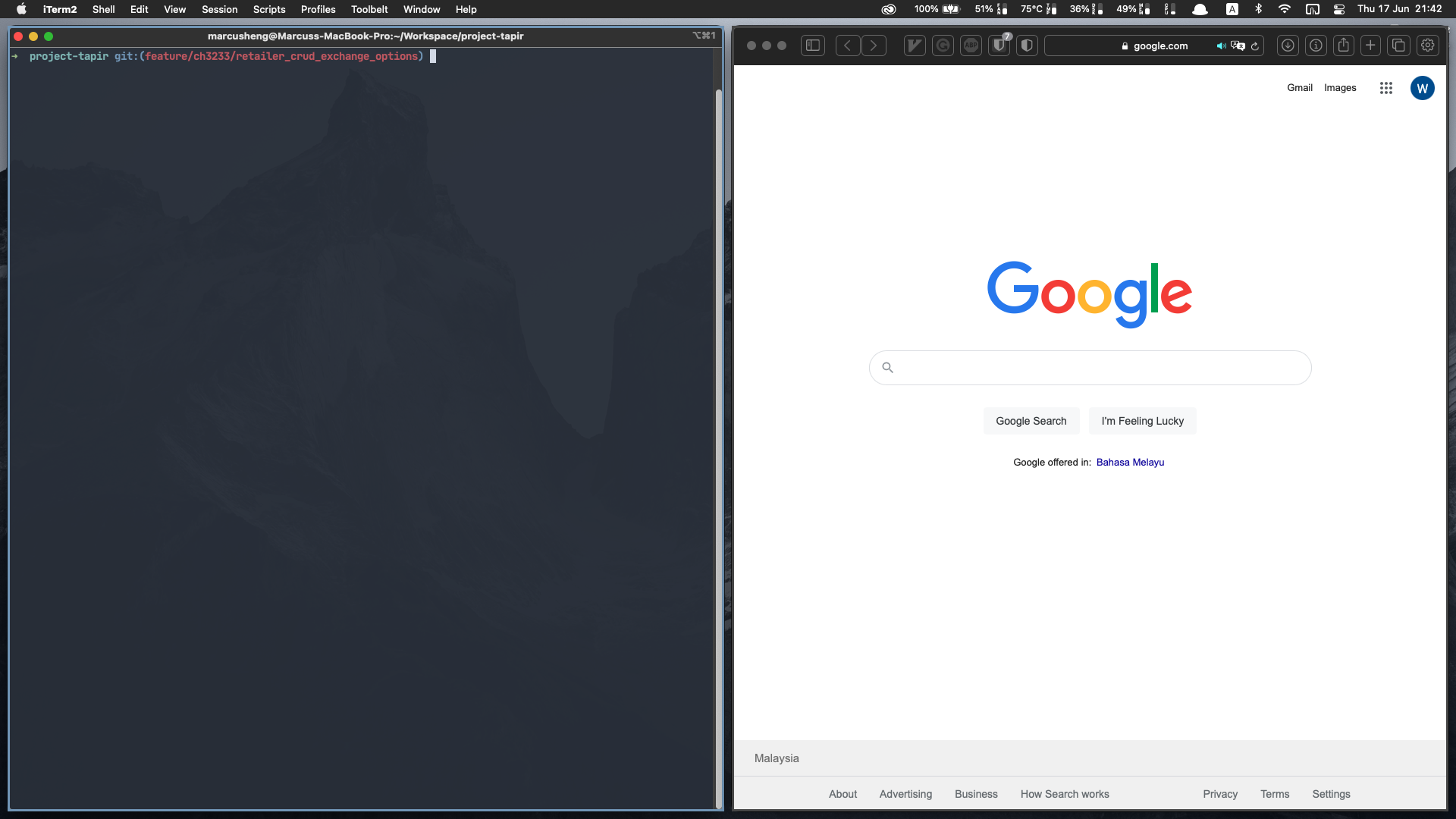
Overall, yabai is an awesome alternative to i3 and I would highly recommend anyone looking for i3 alternatives on macOS to try it out. It might be a good idea to break down the comparison into 3 parts. I will follow up with another 2 posts sharing about my experiences using both macOS and Linux for day to day usage and as a development machine some days later. Thank you for reading this far and wishing everyone a very good day!
![[Week 6, 7 & 8] Long holidays, it's sprinting time now!](https://cdn.hashnode.com/res/hashnode/image/unsplash/KajW8s7AbD4/upload/v1644758117833/Wmj6tiLiL.jpeg)
![[Week 4 & 5] Infrastructure, tools and authentication](https://cdn.hashnode.com/res/hashnode/image/unsplash/vrbZVyX2k4I/upload/v1642913926744/Z7X5OO4em.jpeg)
![[Week 3] Hosting and type checking in Ruby](https://cdn.hashnode.com/res/hashnode/image/unsplash/kME9jbKd--s/upload/v1641820367450/z7q5un_GO.jpeg)
![[Week 2] rails new budgetyourtime](https://cdn.hashnode.com/res/hashnode/image/unsplash/1SsUquHPNT8/upload/v1641134194675/7IGSQNsPtH.jpeg)
![[Week 1] Setting up the foundation](https://cdn.hashnode.com/res/hashnode/image/unsplash/jLwVAUtLOAQ/upload/v1640327581712/2KNKcLtNJ.jpeg)